
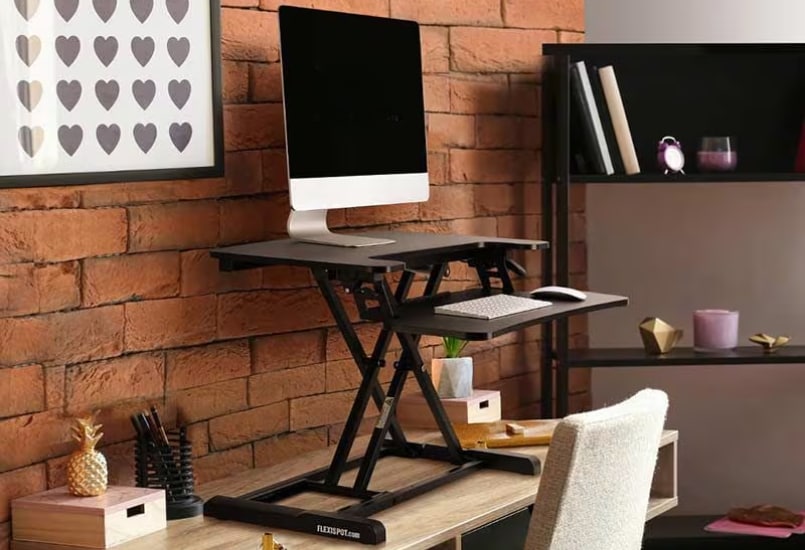
Inflation has a talent for making ordinary life feel like an expensive experiment. Groceries cost more, electricity bills demand a second look, and even a quick coffee run can feel like a questionable financial decision. Meanwhile, your computer screen stays at the same height, your chair remains in the same position, and your body spends another eight hours negotiating with gravity.
At least something could be going up.
Modern work has made sitting almost unavoidable. We answer emails from chairs, attend meetings from chairs, and finish deadlines from chairs. Before long, the afternoon arrives with stiff hips, tired eyes, and a brain that seems to have quietly logged off. The problem is not simply how long we work. It is how little we move while doing it.
Fortunately, improving your workspace does not require replacing your entire desk. A standing desk converter raises your computer and keyboard to standing height while keeping your existing desk underneath. It offers a flexible way to change your working position without the expense of a complete workstation makeover.
When every expense deserves scrutiny, this modest upgrade makes a compelling case for itself. Your desk can rise without your budget having to follow.
--altImgStart--{"link":"https://s3.springbeetle.com/prod-us2-bucket/FlexiSpotSitStandDeskConverter(M7B)_20261015_mHeqO6Tp.png","alt":"FlexiSpot Sit Stand Desk Converter (M7B)"}--altImgEnd--
An Inflation-Friendly Upgrade for Your Workspace
A full standing desk sounds appealing until you consider the price, assembly, and space required. Depending on the model, you may need an entirely new desktop, an adjustable frame, and additional accessories. Electric models offer convenient height adjustments, but they can also add considerably to the cost.
For people who already own a perfectly usable desk, replacing everything can feel unnecessary. Why discard a setup that works when the real problem is its height?
A standing desk converter solves that problem by sitting directly on your existing work surface. Place your monitor, laptop, and other essentials on the platform, then raise or lower it whenever you want to change positions. You can keep your favorite desk, preserve your existing layout, and avoid moving heavy furniture.
This arrangement is particularly useful for renters, people living in compact apartments, and employees working in corporate cubicles. You do not need to permanently modify furniture or dedicate another corner of your room to a new workstation.
Rather than paying for a complete desk replacement, you invest in adjustable working height. It is a practical way to improve your workspace while keeping your budget under control.
Break the Afternoon Slump
The familiar afternoon slump rarely arrives with an appointment. One minute, you are answering messages with enthusiasm. Next, you are rereading the same sentence for the fourth time and wondering whether your coffee has stopped working.
A standing desk converter introduces variety into an otherwise repetitive workday. During a long video conference, you can stand while listening and lower the platform when you need to take detailed notes. While editing photographs, writing reports, or reviewing spreadsheets, you can switch positions instead of remaining seated until the next deadline.
Changing positions may help you feel more alert, particularly when combined with short walks and regular breaks. However, standing alone does not guarantee better concentration or higher productivity. Research suggests that sit-stand workstations can reduce sedentary time, but their effects on performance vary.
The goal is to make movement easier, not turn standing into another task on your schedule. Alternate positions according to your comfort, stretch between assignments, and step away from your screen when possible.
Think of the converter as an invitation to interrupt the routine. Instead of treating eight hours at your desk as one long stretch of sitting, you can divide the day into manageable periods with opportunities to move.
Sometimes, a more flexible workday starts with a simple change in height.
--altImgStart--{"link":"https://s3.springbeetle.com/prod-us2-bucket/womanusingFlexiSpotSitStandDeskConverter(M7B)_20261015_YtjH5zln.png","alt":"woman using FlexiSpot Sit Stand Desk Converter (M7B)"}--altImgEnd--
Set Up a More Comfortable Workstation
Your body was not designed to remain in one position indefinitely. Yet many office routines encourage awkward habits, from hunching over laptops to leaning toward monitors and allowing shoulders to creep toward the ears.
A standing desk converter gives you more control over your workstation's height, but its benefits depend on how you use it. When standing, keep your shoulders relaxed and your elbows close to your body, bent at approximately 90 degrees. Your wrists should remain relatively straight while typing, and your monitor should sit at a height that lets you look ahead without constantly bending your neck.
When sitting, ensure your feet rest comfortably on the floor or a footrest, and use a chair that supports your back. Adjust both arrangements to suit your body rather than assuming one height works for everyone.
Standing is not automatically healthier than sitting. Remaining upright for hours can cause discomfort in your feet, knees, and lower back. Alternate positions, take short movement breaks, and avoid treating either posture as something you must maintain all day.
If you work on a hard floor, an anti-fatigue mat may make standing more comfortable. The priority is a workstation that supports your tasks without encouraging unnecessary strain.
How to Choose the Right Standing Desk Converter
Before buying a standing desk converter, consider what you actually use during a typical workday. A lightweight laptop setup requires less space and lifting capacity than a workstation with two large monitors, speakers, and several accessories.
Start with the platform dimensions. Measure your equipment and leave enough room for your keyboard and mouse. Check the converter's weight capacity carefully, including the equipment placed on its main surface and any separate keyboard tray.
Next, consider the adjustment mechanism. Manual converters can be economical, while gas-spring models use a counterbalance mechanism to help raise and lower the platform smoothly. Electric models use a motor for powered adjustment but typically cost more and require access to electricity.
The right choice depends on your budget, equipment, and how frequently you expect to change heights. A converter that is difficult to adjust may discourage regular use, so convenience matters.
Stability is equally important. The platform should remain steady while you type, and the base should sit securely on your desk. Protective pads can help prevent scratches on wooden or laminated surfaces.
Finally, consider cable management and keyboard placement. Loose cables can become inconvenient when the platform moves, while a poorly positioned keyboard may strain your wrists. Choose a design that accommodates your equipment, fits your workspace, and makes changing positions simple.
--altImgStart--{"link":"https://s3.springbeetle.com/prod-us2-bucket/womanusingFlexiSpotSitStandDeskConverter(M7B)whilesittingdown_20261015_yhc6rNDr.png","alt":"woman using FlexiSpot Sit Stand Desk Converter (M7B) while sitting down"}--altImgEnd--
Meet the FlexiSpot M7B Standing Desk Converter
If you want adjustable working height without replacing your entire desk, the FlexiSpot Sit Stand Desk Converter (M7B) offers useful features for a home office or compact workstation.
Its main desktop measures 28.4 by 16.3 inches, providing space for everyday computer equipment. The height adjustment range runs from 4.7 to 19.7 inches, allowing you to find a suitable working position. A single handle controls the adjustment, making it straightforward to change the platform's height throughout the day.
The M7B features a removable keyboard tray measuring 28.4 by 12.1 inches. Its quick-release design lets you attach or remove the tray depending on your setup. Prefer working with a laptop alone? Remove the tray for a simpler arrangement. Need a separate typing surface? Reattach it when necessary.
For laptop users, the desktop includes a 34.1-inch-wide U-shaped cutout designed to accommodate laptops up to 17 inches. Its stable base is designed to reduce shaking, while protective rubber pads help prevent scratches on your existing desk.
The stated weight capacity is 33 pounds for the main desktop and 4.4 pounds for the keyboard tray. Check your equipment's weight against both limits before setting up your workstation.
Before purchasing, measure your available desk space and consider your equipment. The M7B is a practical option when its dimensions, adjustable height, and removable tray match your everyday working needs.
Make Your Workspace Work for You
A standing desk converter will not lower grocery prices, reduce your electricity bill, or convince your landlord to freeze the rent. Its value is more immediate: it gives you an affordable way to make your existing workstation more adaptable.
Start by alternating between sitting and standing for manageable periods. Pay attention to your comfort, adjust the platform when necessary, and add short walks between tasks. You do not need to overhaul your schedule to make movement a regular part of your workday.
The best workstation is not the most expensive one or the one that looks impressive in a photograph. It is the one that fits your space, supports your work, and suits your budget.
Inflation may be beyond your control, but your working environment offers opportunities to make things better. You do not need an entirely new office to change your daily routine. Sometimes, all it takes is a little more room to rise.
Let the bills keep climbing if they must. Your desk can rise for a much better reason.