
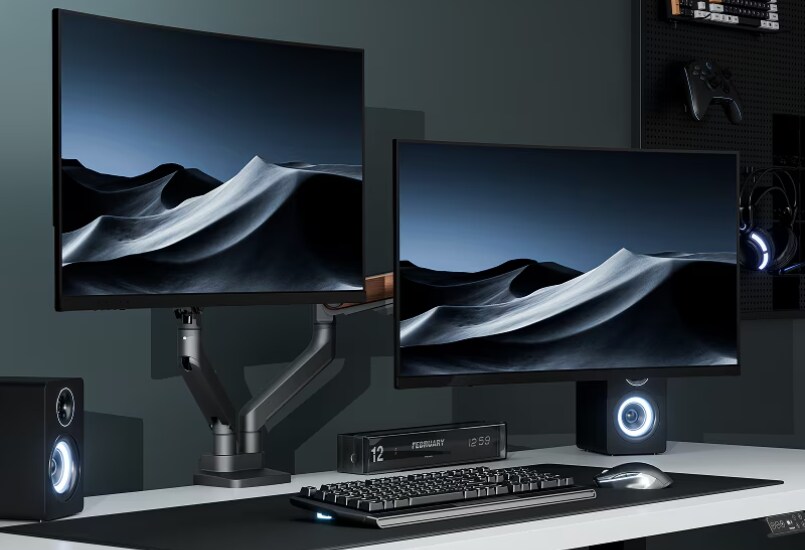
Some changes feel small at first. You expect a slight improvement, maybe a little extra comfort, but nothing that will truly change how you work. Adding a second monitor seemed like one of those decisions. I thought it would simply give me more screen space. Instead, it changed the rhythm of my entire day.
The first morning with two monitors felt surprisingly calm. I wasn't constantly minimizing windows or searching through tabs. My work flowed instead of stopping every few minutes. My eyes knew where to look. My hands moved with purpose. Tasks that once felt scattered suddenly fit together like pieces of the same puzzle.
The more I used a dual-monitor setup, the more I realized it wasn't about owning another screen. It was about removing tiny interruptions that quietly steal time and attention. Those interruptions add up over hours, days, and weeks.
Now, every time I sit down at a desk with only one monitor, it feels like trying to cook in a kitchen with half the counter space. You can make it work, but everything takes more effort than it should. Once you experience the freedom of a second display, it's difficult to imagine working any other way.

My Work Finally Had Room to Breathe
A single monitor asks your brain to juggle more than it should. Every project becomes a cycle of opening, closing, minimizing, and reopening windows. Those little movements seem harmless until you realize how often they interrupt your focus.
Adding a second monitor gave every task its own place. I could write on one screen while researching on the other. Video meetings stayed visible without covering important documents. Email remained open without constantly stealing the space needed for creative work. Editing photos, comparing spreadsheets, reviewing designs, and managing multiple browser windows suddenly became effortless.
Researchers have long studied multitasking, and many findings suggest that people work better when they reduce unnecessary task switching. A second monitor doesn't magically make someone more productive, but it does remove many of the tiny barriers that slow work down. Instead of spending energy finding the right window, your attention stays on the work itself.
The difference is especially noticeable for remote workers, students, programmers, designers, video editors, and anyone who regularly references multiple files. Even everyday tasks like online shopping, budgeting, planning vacations, or organizing family schedules become smoother when information stays visible.
What surprised me most wasn't that I finished projects faster. It was that I finished them feeling less tired. My mind no longer had to remember where everything was hiding. Every document had a home. Every window stayed within reach. That quiet sense of order made work feel lighter from morning until evening.

Less Clutter on My Screen Meant Less Clutter in My Mind
A crowded desktop often creates a crowded mind. When dozens of tabs compete for attention, your eyes keep searching for what matters most. Even if you don't notice it happening, your brain is constantly filtering visual noise.
Two monitors create breathing room. One screen can hold your primary task while the other supports it. Instead of stacking windows on top of one another, each application stays visible without fighting for space.
That simple change affects more than productivity. It also reduces frustration. You stop losing your train of thought because you accidentally closed the wrong window. You stop interrupting conversations during virtual meetings just to find a missing file. You spend less time reorganizing your desktop and more time actually working.
Over time, I also became more intentional about how I arranged my workspace. One monitor became my focus screen. The second handled references, communication, calendars, music, and background tasks. This consistent layout helped my brain settle into work faster each day.
The effect reached beyond the office. During personal projects, I could edit family photos while viewing inspiration on another screen. I watched tutorials while practicing new skills without constantly pausing videos. Even simple entertainment became more enjoyable when I could keep conversations, streaming services, or sports scores open without interrupting what I was doing.
Sometimes better productivity doesn't come from working harder. It comes from removing friction. A second monitor quietly removes dozens of small frustrations you barely notice until they disappear.

Comfort Matters More Than Most People Realize
More screens only help if they are positioned correctly. Early on, I made the mistake of placing my second monitor wherever it fit. Before long, I noticed stiff shoulders, a sore neck, and tired eyes from constantly twisting my body to see both displays.
That experience taught me something important. Ergonomics is not about expensive office furniture or complicated setups. It is about helping your body move naturally throughout the day.
When both monitors sit at the proper height and distance, your eyes travel smoothly between screens instead of forcing your neck to do all the work. Your shoulders stay relaxed. Your posture improves because you no longer lean forward or hunch over your keyboard. Even your desk feels larger because the monitors occupy space more efficiently.
Good monitor placement also supports healthier viewing habits. Keeping screens at eye level encourages a neutral neck position, while maintaining the proper viewing distance reduces eye strain during long work sessions. Small adjustments can make long hours behind a computer feel far more comfortable.
The longer I worked with two monitors, the more I realized the screens themselves weren't the whole story. Their position mattered just as much. A thoughtful setup allows technology to fade into the background so your attention stays on your ideas instead of physical discomfort.
Productivity and comfort are deeply connected. When your workspace supports your body, your mind has more freedom to focus on meaningful work.

The Upgrade That Completed My Setup: FlexiSpot Premium Monitor Mount F9/F9D
Once I committed to using two monitors every day, I realized they deserved better support than the stands that came in the box. That's when the FlexiSpot Premium Monitor Mount F9/F9D became the finishing touch that brought the entire workspace together.
Built with rock-solid stability, it effortlessly supports monitors weighing up to 44 pounds, making it an excellent choice for larger displays and curved monitors. Instead of worrying about screen wobble every time I adjusted my desk or typed quickly, everything stayed steady and secure. That stability creates a more comfortable experience whether you're working through a busy afternoon or relaxing with games after hours.
Installation is refreshingly simple. The mount offers both clamp and punch mounting options, making it easy to fit different desk setups. Within minutes, the monitors were lifted off the desktop, instantly creating more room for notebooks, keyboards, speakers, and everything else I actually use.
The spring-assisted VESA panel makes adjustments feel smooth and precise, even with heavier screens. Raising, lowering, tilting, or repositioning the monitors requires very little effort, allowing each display to stay exactly where it feels most comfortable. The built-in cable routing system keeps power and display cables hidden through three routing joints, giving the desk a clean and organized appearance with far fewer distractions. For added peace of mind, the 180-degree safety rotation stop helps prevent over-swiveling, protecting both the monitors and nearby walls while keeping every adjustment controlled and secure.
Looking back, adding a second monitor changed how I worked. Pairing it with the FlexiSpot Premium Monitor Mount F9/F9D changed how my entire workspace felt. Everything became cleaner, more comfortable, and easier to use. It's one of those upgrades you notice every single day because it quietly removes the little annoyances that once seemed impossible to avoid. Once you've experienced that kind of setup, it's hard to imagine working any other way.