
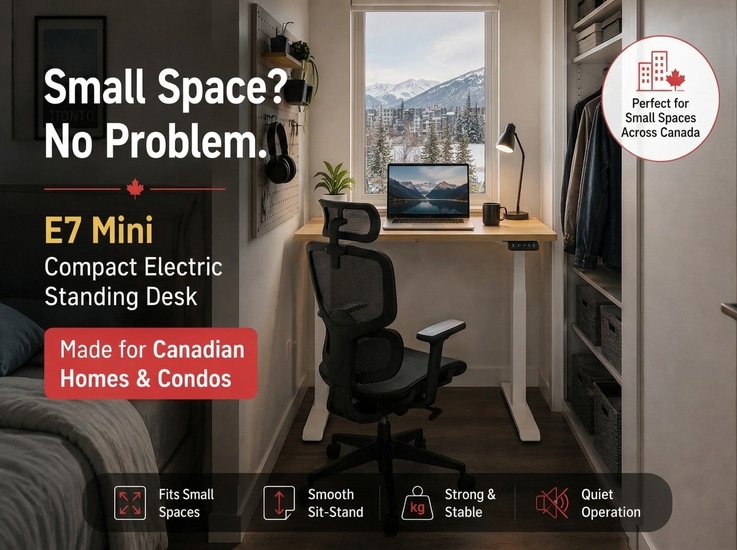
A standing desk can make a home office more flexible, but a full-size desk does not always make sense when floor space is limited. If your workspace is a bedroom corner, small den, or compact condo in a Canadian city, every inch matters. This can be especially challenging in rental apartments, where a dedicated home office may not be available.
The challenge is not simply finding a desk that fits the wall. It is finding a desk that leaves enough room for your monitor, keyboard, chair, legroom, and movement around the workstation.
The smallest standing desk is not always the best standing desk for a small room. A desk that saves a few inches of floor space but leaves no room for your monitor, keyboard, chair, or movement may make the workspace less functional.
This guide helps you figure out how much space your setup actually needs, what size desk works for your equipment, and when a compact electric standing desk makes more sense than a larger model or a converter.
Quick Answer: How Much Space Does a Compact Standing Desk Need?
The space you need depends on your desktop size, equipment, chair, and room layout. A laptop-only setup can work with a smaller surface, while a monitor or multi-monitor setup generally needs more desktop width and depth. You also need enough room for the desk footprint, chair movement, legroom, walking paths, cables, and the desk's full height range.
How Much Desktop Space Do You Need?
There is no single desk size that works for every small home office. The right dimensions depend on what you need to place on the desktop and how much room you have around it.
The goal is not to choose the smallest possible desk. It is to find the smallest desk that can comfortably support your everyday setup. For small rooms, desktop depth can matter just as much as width because it affects both monitor placement and how far the desk extends into the room.
| Your Setup | Practical Desk Width | What to Consider |
| Laptop only | Around 32–40 in (81–102 cm) | Prioritize depth and legroom |
| Laptop + one monitor | Around 40–48 in (102–122 cm) | Make sure the monitor and keyboard fit comfortably |
| Laptop + monitor + accessories | Around 48–50 in (122–127 cm) | Allow room for speakers, a phone, or notebook |
| Dual monitors | Around 48–55 in (122–140 cm) | Monitor size and placement become more important |
| Three monitors or large setup | 55+ in (140+ cm) | Consider a larger desk or monitor arms |
These ranges are practical starting points rather than universal requirements. Actual space requirements vary depending on monitor size, keyboard placement, accessories, working style, and available clearance.
How to Decide Between Sizes
Before choosing a size, lay out your equipment on a table or the floor. Arrange your monitor, keyboard, mouse, laptop, and other items in the positions you would use them. Measure the width and depth they occupy. Then check whether you still have enough surface area for comfortable keyboard, mouse, and monitor placement.
This simple step can give you a more accurate estimate than relying on general size categories.
How Much Floor Space Does a Compact Standing Desk Need?
The desktop is only one part of the footprint. A common mistake is measuring only the desk itself and forgetting the space needed to actually use it.
Think of your workspace as three layers: the desk footprint, the user zone, and the movement zone.
- Desk footprint: the desktop and the frame beneath it
- User zone: the area your chair and legs occupy while sitting
- Movement zone: walking paths and access to nearby doors, drawers, or furniture
A Practical Way to Estimate Your Workspace
Start by measuring the desk footprint. Then add enough room for your chair, legs, and walking paths. Instead of relying on one universal clearance number, measure the actual space your workstation requires.
In other words, measure the space you need to use the desk, not just the space the desk occupies.
Desk Footprint
The desktop dimensions do not always tell you the full footprint of the desk. The frame, legs, and any components extending below or beyond the desktop can also affect how much space the workstation occupies. Check the full frame dimensions before buying, especially for desks that need to fit into tight alcoves or between furniture.
Chair Clearance
Your chair needs room to move in and out. If the desk sits against a wall, make sure you can pull the chair out comfortably. If it is positioned in a bedroom or living room, check that the chair does not block a doorway or interfere with another piece of furniture.
A desk that fits on paper may still be too large for the room once the chair is included.
Legroom
You also need space under the desk for your legs and feet. The frame and crossbars should not interfere with your knees or restrict your foot placement.
Walking Path
In a small room, every walking path counts. If the desk creates a bottleneck or requires you to step around it to reach a door, drawer, or window, the layout may not be practical.
What Clearance Does a Standing Desk Need?
A standing desk moves vertically, so you need to consider both the space around the desk and the space above it.
Cable Movement
When the desktop moves up and down, cables need enough slack to move with it. If you place the desk against a wall, make sure the power cord, monitor cables, and other connections can move freely without pulling on ports or outlets.
Vertical Clearance
Measure the height of shelves, cabinets, or window sills above the desk. The desk should be able to raise to its maximum height without hitting shelves, cabinets, windows, or other objects above it.
A useful approach is to mark the desk footprint, chair clearance, and walking paths on the floor with painter's tape before buying. This gives you a better idea of how much space the desk and chair will actually occupy.
How to Make a Compact Standing Desk Work in Less Space
A small workspace does not always require the smallest possible desk. Sometimes, the better solution is to use the available surface more efficiently.
Before you buy a smaller desk, consider whether your current setup could be more space-efficient.
1. Use a Monitor Arm
A monitor arm can free up significant desktop space by lifting the screen off the surface. It also allows you to position the monitor at a better viewing distance and height.
2. Use a Laptop Stand
A laptop stand can reduce the desk area your laptop occupies. It also improves the viewing angle for your screen.
3. Use Vertical Storage
Use wall-mounted shelves, pegboards, or vertical organizers to keep accessories off the desktop. This is particularly useful in small spaces where horizontal space is limited.
4. Manage Cables
Cables take up more space than they appear to. Simple cable management can make a compact desk feel more organized and usable.
5. Keep Only Essential Items on the Desktop
Instead of asking how to fit more items onto the desk, ask which items actually need to stay on the desk. A smaller setup can feel more comfortable when unnecessary items are moved elsewhere.
What to Look for in a Compact Electric Standing Desk
Once you have the space figured out, there are a few additional factors that affect whether a compact standing desk will actually work for you.
1. Height Range for Sitting and Standing
A sit-to-stand desk needs to work in two different positions. Check both the lowest and highest available settings. A wide adjustment range gives you more flexibility to find a comfortable position instead of relying on a single preset height.
2. Stability at Standing Height
A compact desk should not feel like a compromise in stability. Look for a frame that provides adequate support across the full height range. Reinforced construction, a rigid frame, and properly adjusted leveling feet can all contribute to a more stable workspace.
3. Desktop Depth and Frame Design
In a compact workspace, desktop depth can be just as important as width. A desk that is too deep may take up unnecessary floor space, while a desk that is too shallow may leave insufficient room for your monitor and keyboard. Also check where the frame and legs sit underneath the desktop, since their position can affect usable legroom.
4. Weight Capacity
A compact desk still needs enough weight capacity for your equipment. Add up the approximate weight of your monitor, laptop, accessories, and other items you plan to keep on the desk, then compare the total with the desk's recommended load capacity.
Compact Standing Desk vs. Standing Desk Converter
If space is limited, you do not necessarily need to replace your existing desk.
A standing desk converter can turn a traditional desk into a sit-stand workstation. A compact electric standing desk, on the other hand, replaces the entire work surface and allows the whole desk to move between sitting and standing positions.
Both options can work well, but they solve different problems.
Choose a Compact Electric Standing Desk If...
A compact electric standing desk may be the better choice if you:
- Need a dedicated workstation
- Want the entire work surface to move
- Switch between sitting and standing frequently
- Want a clean setup without a large converter sitting on the desktop
- Are creating a new workspace in a small room
- Need the desk to work for both sitting and standing from the start
--altImgStart--{"link":"https://s3.springbeetle.com/prod-us2-bucket/compact-vs-large-standing-desk-home-office-setup_20260817_pHS9e7lA.png","alt":"Compact and larger standing desk setups compared for different home office needs."}--altImgEnd--
Choose a Standing Desk Converter If...
A converter may make more sense if you:
- Already have a desk you like
- Have very limited room for a new desk
- Only occasionally want to work standing
- Want to keep your existing storage or desk configuration
- Need a lower-cost way to experiment with standing
Which Option Is Better for a Small Home Office?
If you already have a functional desk and only want to add standing occasionally, a converter can be the simpler solution.
If you are building a dedicated workspace from scratch, a compact sit-stand desk is usually more flexible. The entire work surface can move together, and you do not have to sacrifice part of your desktop to a separate lifting platform.
Example: Using a Compact Electric Standing Desk in a Small Canadian Home Office
For example, a compact model such as the E7-Mini can illustrate how a smaller workstation may fit into a limited footprint. Its compatible desktop sizes range from 31.5 × 23.6 inches to 40 × 31.5 inches (approx. 80 × 60 cm to 102 × 80 cm), giving users several options for smaller workspaces.
Rather than asking whether a specific desk is "small enough," compare its dimensions with your own equipment and available floor space.
--altImgStart--{"link":"https://s3.springbeetle.com/prod-us2-bucket/flexispot-e7-mini-compact-standing-desk-sizes_20260817_xA052hK4.png","alt":"Flexispot E7-Mini compact electric standing desk showing desktop size options for small spaces."}--altImgEnd--
How Different Setups May Work on the E7-Mini
| Setup | Space Consideration |
| Laptop only | Plenty of room for a compact setup |
| Laptop + one monitor | Usually workable on a compact surface |
| Laptop + monitor + keyboard + mouse | Requires more careful layout |
| Two monitors + laptop | Monitor arms may help free up space |
| Three monitors | A wider desk may be more practical |
Height Range and Sit-Stand Use
The E7-Mini's listed height range is 22.8 to 48.4 inches (58–123 cm) without the desktop, giving users flexibility to set different positions for sitting and standing. The appropriate range still depends on the user's height and preferred working posture.
Who Is the E7-Mini Best Suited For?
Based on its compact dimensions, the E7-Mini may be a practical option for laptop-focused setups or workstations with one monitor. For users with larger monitors, multiple displays, or more equipment, a wider desktop may provide a more comfortable setup.
Who Should Choose a Larger Standing Desk Instead?
A compact electric standing desk is not the right answer for every home office. If you regularly use multiple monitors, work with paper documents, or need a large surface for several activities, a larger desk may be more practical.
Choose a Larger Desk If You Use Multiple Large Monitors
A laptop and one monitor can work well on a compact surface. Three monitors or multiple large displays are different. If you use a large multi-monitor setup, you may need additional width to position the screens comfortably.
Choose a Larger Desk If You Work With Paper Documents
If your work involves printed documents, notebooks, reference materials, or physical equipment, you may need more room to spread out. A compact desk can become frustrating if you constantly have to move one item to make room for another.
Choose a Larger Desk If the Desk Is Your Main Workstation
If your desk is also used for gaming, creative work, studying, paperwork, and other activities, additional surface area can provide useful flexibility. In that case, the best desk may be the largest one that fits the room comfortably rather than the smallest one available.
Quick Checklist: Does a Compact Standing Desk Fit Your Space?
Before buying, run through this checklist.
Desktop Space
- Is the surface large enough for your monitor, keyboard, and mouse?
- Do you have room for frequently used accessories?
- Would a monitor arm help free up desktop space?
Desk Footprint
- Does the desk fit the available floor area?
- Can the desk move through its full height range without hitting shelves, windows, or other furniture?
- Will the desk interfere with doors, drawers, or walking paths?
Working Clearance
- Is there enough room for your chair to move in and out?
- Do you have adequate legroom under the desk?
- Is the height range suitable for both sitting and standing?
- Are cables long enough to move with the desk?
If you can answer yes to most of these questions, you are probably looking at the right type of desk for your space.
Frequently Asked Questions
1. How much desk space do I need for a small home office?
For a laptop-only setup, a compact desktop may be enough. A laptop plus one monitor generally requires more width and depth, while dual-monitor or equipment-heavy setups may benefit from a larger surface. The right size depends on your equipment and the clearance available around the desk.
2. What is the smallest size for a standing desk?
There is no universal minimum size. For a compact workstation, the smallest practical size depends on whether you use a laptop, one monitor, or a larger multi-monitor setup. A desk that is too small for your equipment will not be comfortable, even if it saves floor space.
3. How deep should a compact standing desk be?
Depth is often more important than width in a compact desk because it affects how close your monitor sits to your eyes and how much room you have for your keyboard. A depth of around 24 inches (61 cm) is common for compact desks, but there is no universal minimum. The right depth depends on your monitor size, viewing distance, keyboard position, and other equipment.
4. How much clearance does a standing desk need in a small room?
You need enough clearance for the desk to move through its full height range, for your chair to move in and out, and for nearby doors, drawers, and walkways to remain usable. The exact amount depends on your room layout and the desk's dimensions.
5. Is a compact electric standing desk good for a small room?
Yes. A compact electric standing desk can work well in a small room if the desktop fits your equipment and you have enough clearance for your chair, legs, and movement. Measure the full footprint and vertical space before buying.
6. Can a standing desk fit in a small bedroom?
Yes. A compact standing desk can work well in a bedroom if you have enough room for the desk, chair, legroom, and a clear path around the workstation. Measure the full footprint before buying rather than measuring only the wall space.
Conclusion
The right compact standing desk is the smallest one that gives you enough room to work without making the rest of the room harder to use.
Measure the desktop, full desk footprint, chair clearance, and vertical space before you buy. Once you know those numbers, it becomes much easier to decide whether you need a compact desk, a larger workstation, or a standing desk converter.
For people working in a bedroom, condo, apartment, basement, or small den—especially in compact Canadian cities—a compact sit-stand desk can provide a practical alternative to a full-size workstation. Whether you choose a compact model, a larger desk, or a converter, the best choice starts with your actual space, equipment, and clearance needs.