
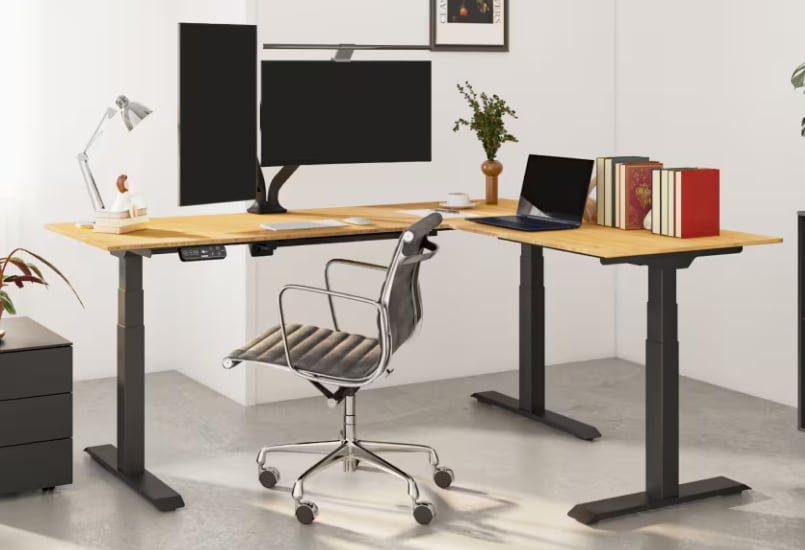
A desk is supposed to make work easier, yet a single flat surface can quickly become a crowded landscape of open laptops, scattered notes, coffee cups, and unfinished tasks. Add dozens of browser tabs and a steady stream of notifications, and even simple work begins to feel overwhelming. The problem is not always a lack of discipline. Sometimes, the workspace itself makes concentration harder.
An L-shaped standing desk offers another way to organize the day. Its 90-degree bend creates two distinct work zones, giving different tasks their own physical spaces. Instead of switching endlessly between digital windows, you can turn toward another surface. This small movement can help separate activities, reduce visual clutter, and make work feel more manageable. It is not a guaranteed shortcut to genius, but it can create a useful foundation for better focus.
--altImgStart--{"link":"https://s3.springbeetle.com/prod-us2-bucket/L-shapeddeskdividedinto2zones_20261022_qxRqr1jF.png","alt":"L-shaped desk divided into 2 zones"}--altImgEnd--
Zone A vs. Zone B: Spatial Psychology 101
Our surroundings influence how we organize information and approach tasks. A workspace divided into two zones can turn that principle into a practical habit. One side becomes the main stage for demanding work, while the other serves as a quieter space for planning, reading, or creative thinking.
Zone A might hold multiple monitors, spreadsheets, video calls, and documents tied to immediate deadlines. Zone B could accommodate a notebook, reference books, sketches, or personal projects. Each surface develops a clear purpose through repeated use.
Turning between the two zones introduces a physical transition that may help mark a change in activity. Although a 90-degree turn does not automatically reset the brain, environmental cues can support routines and attention. Over time, associating each area with specific tasks may make it easier to settle into the appropriate mode of work.
The Death of Digital Context-Switching
Every time you jump between unrelated tasks, your attention needs time to adjust. Moving from a spreadsheet to an email, then to a messaging app, can interrupt your train of thought even when each switch takes only seconds. These interruptions become particularly costly when demanding work requires sustained concentration.
An L-shaped desk cannot eliminate digital distractions, but it can reduce the temptation to keep every activity within immediate reach. Keep essential monitors and work applications on the main surface, then reserve the second wing for handwritten notes, printed references, or tasks that do not require another screen.
This arrangement allows you to shift activities without abandoning your physical workspace. When you turn away from your inbox, you also change what occupies your visual field. That distinction can reinforce a simple rule: one zone, one primary purpose. Pair the layout with notification limits and scheduled email checks to make the benefit more meaningful.
--altImgStart--{"link":"https://s3.springbeetle.com/prod-us2-bucket/manusingFlexiSpotE7L(1)_20261022_wyWdsC7g.png","alt":"man using FlexiSpot E7L"}--altImgEnd--
The Ergonomic Placebo: Looking and Feeling Like an Air Traffic Controller
An organized command center can make a busy workday feel more controlled. With an L-shaped standing desk, multiple monitors, documents, and accessories can occupy separate areas instead of competing for a small patch of tabletop. The result resembles an operations station, where everything has a place and important tools remain accessible.
The psychological benefit, however, comes from organization rather than appearance alone. A spacious desk will not automatically improve judgment or concentration. Its real value lies in making useful routines easier to follow.
An adjustable standing desk adds another dimension. You can sit while handling detailed computer work, then raise the surface for standing tasks, reviewing documents, or sketching ideas. Changing posture provides physical variety and may help reduce discomfort from prolonged sitting. With the FlexiSpot Pro L-Shaped Standing Desk E7L, three-stage legs adjust from 25.0 to 50.7 inches, allowing users to find a suitable working height. The goal is a workspace that supports both comfortable movement and clear thinking.
Real-World Applications: How to Make Two Surfaces Work
The best desk arrangement reflects the way you actually work. For professionals balancing a full-time job and a side business, one wing can hold employer-related equipment while the other accommodates personal projects. This separation helps keep materials organized and makes it easier to return to unfinished work without rebuilding the entire setup.
Another approach divides deep work from administration. Reserve the larger surface for writing, design, coding, or complex analysis. Use the shorter wing for email, scheduling, paperwork, and other routine duties. Completing administrative tasks in a defined area can help prevent them from spreading across the entire desk.
You can also divide analog and digital activities. Keep monitors, keyboards, and charging equipment on one side, with notebooks, printed reports, and reference materials on the other. This arrangement creates room for different ways of thinking without requiring a separate office.
The FlexiSpot E7L supports these setups with a spacious, reversible desktop suitable for left-handed and right-handed users. Its industrial-grade steel frame supports up to 440 pounds, while three motors power height adjustments. The keypad stores up to three height presets, making changes between sitting and standing more convenient. Desktop options include bamboo and black-and-white chipboard, allowing the workspace to suit different interiors.
--altImgStart--{"link":"https://s3.springbeetle.com/prod-us2-bucket/L-shapedstandingdeskforprofessionals_20261022_bHH2wb2Y.png","alt":"L-shaped standing desk for professionals"}--altImgEnd--
Conclusion: Embrace the Geometry of Focus
Better productivity does not always begin with another application, a stricter schedule, or a complicated system. Sometimes, it begins with looking at your workspace differently. A single surface asks your eyes, hands, and attention to manage everything in one place. An L-shaped desk introduces another option: give different activities different physical homes.
The distinction matters because organization can reduce unnecessary decisions. When your notes remain separate from your monitors and routine administration has its own space, you spend less time rearranging your surroundings and more time working on the task at hand. Turning between zones can also become a useful cue for changing activities deliberately.
The FlexiSpot Pro L-Shaped Standing Desk E7L brings this approach together with a sturdy frame, reversible desktop, three-motor adjustment system, and generous weight capacity. Its 15-year limited, non-transferable warranty provides additional long-term purchase reassurance.
A 90-degree turn will not solve every productivity problem, and multitasking still carries cognitive costs. Yet a thoughtfully divided workspace can make those costs easier to manage. Sometimes, the most useful change is not doing more at once. It is giving each important task the space it deserves.